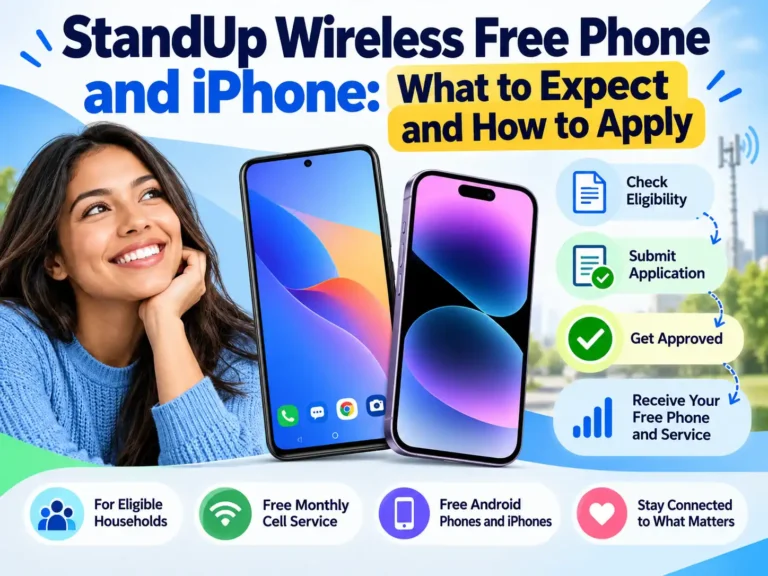
A reliable phone can make it easier to find work, contact a doctor, and stay in touch with family. StandUp Wireless may help eligible customers lower that cost through the federal Lifeline program.
There are two different offers to understand. Lifeline can provide free monthly phone service. StandUp may also offer a free handset to some customers, but the device and eligibility depend on the offer available in your area. A free iPhone is not promised. You may be able to use an iPhone you already own if it is unlocked and passes StandUp’s compatibility check.
This guide explains who may qualify, what “free phone” can mean, and how to check the details before you apply.
Quick answer: Can StandUp Wireless provide a free phone or iPhone?
| What you want | What to know |
|---|---|
| Free monthly phone service | Available to eligible Lifeline customers in participating areas. |
| A free phone | StandUp’s terms say some customers may qualify for a free device. Model and availability can vary. |
| A free iPhone | Do not count on one. StandUp’s public phone list is a compatibility list, not a promise of a free iPhone. |
| Use your own iPhone | Possible if it is unlocked and the IMEI check confirms it works on the network. |
| Keep your number | StandUp says customers can transfer an existing number after service is approved. |
What does StandUp Wireless Lifeline include?
Lifeline is a federal program that helps eligible households pay for phone or internet service. StandUp Wireless is one provider in the program. Its current pages describe a free monthly plan with talk, text, and data for approved customers.
The amount of data, service details, and available devices can vary by state and ZIP code. Check the plan shown for your address before you enroll. Do not assume that a plan advertised in another state is available where you live.
A free service plan and a free handset are separate things. StandUp’s terms say you may be eligible for a free wireless device. If you do not qualify for one, the company may provide a SIM for a compatible phone you already own or buy. It also says some higher-grade devices may be available for an extra cost. Read the current StandUp Wireless Lifeline terms and the offer summary before accepting a device.
Who may qualify for a free StandUp Wireless phone?
You may qualify for Lifeline through a participating benefit program or your household income. Programs commonly accepted include:
- SNAP
- Medicaid
- Supplemental Security Income, or SSI
- Federal Public Housing Assistance, including Section 8
- Veterans Pension or Survivors Pension
- Certain Tribal assistance programs
You may also qualify if your gross household income is at or below 135% of the Federal Poverty Guidelines. For 2026, that limit is $21,546 for a one-person household and $44,550 for a four-person household in the contiguous states and Washington, D.C. Alaska and Hawaii use different limits. The USAC Lifeline eligibility page has the full current table and program rules.
Lifeline allows one benefit per household. A household generally means people at the same address who share income and household expenses. If someone in your household already receives Lifeline, you may need to complete an extra household form or transfer that benefit instead of opening a second one.
Can you get an iPhone through StandUp Wireless?
StandUp lets customers bring a compatible phone. Its compatibility page lists several iPhone models, including the XR, XS, X, iPhone 8, iPhone 7, and some iPhone SE models. The list can change, and appearing on it does not guarantee that a specific phone will work. Use the official IMEI compatibility check before applying.
An iPhone also needs to be unlocked. A phone that is locked to another carrier may not accept StandUp’s SIM, even if its model appears on the list. To find an iPhone’s IMEI, open Settings, tap General, then About. Enter that number only in StandUp’s official checker.
The compatibility list does not mean those iPhones are free devices. It only shows examples of phones that may work with StandUp service. If your goal is specifically an iPhone, compare other options in our guide to Lifeline eligibility and current iPhone offers. If you are open to other brands, our Samsung phone and Lifeline guide explains what to check before choosing a device.
What documents might you need?
The National Verifier checks whether you qualify. It may confirm your information electronically. If it cannot verify your eligibility, you may need to upload documents.
For SNAP, StandUp asks for a recent award letter, benefits statement, or participation letter that shows your name, the program, and a current issue or effective date. An EBT card by itself is not accepted as proof for federal Lifeline on StandUp’s eligibility page. California’s separate state LifeLine program has different rules for EBT cards.
For Medicaid or SSI, use a current letter, statement, or other official proof of enrollment. For income qualification, you may need records such as tax documents or recent pay stubs. A government-issued photo ID may also be requested. The National Verifier or StandUp’s application will tell you which documents apply to your case.
How to apply for StandUp Wireless
- Check your ZIP code. Confirm that StandUp offers Lifeline service in your area.
- Review your eligibility. Choose a qualifying program or check your household income against the current limit.
- Gather your documents. Have your ID and benefit or income records ready in case the system asks for them.
- Apply through StandUp’s official website. Enter your legal name and address carefully so they match your documents.
- Complete verification. The National Verifier may approve you automatically or request more proof.
- Check the device and plan offer. Confirm whether the offer includes a free phone, a SIM for your own device, or a paid upgrade. Review data limits and other terms.
- Activate service. Follow the SIM or eSIM instructions after approval.
If you want to keep your current number, wait until the transfer is complete before canceling your old service. StandUp says you may need your current carrier’s account number and transfer PIN. The bring-your-own-phone and number guide explains its porting steps.
Details to check before you accept a phone
“Free” can refer to the monthly service, the handset, or both. Ask what the offer includes before you submit an order. Confirm the device model, whether it is new or refurbished, any shipping or upgrade charge, and whether the phone can later be unlocked. Check the service area, data allowance, and rules for keeping your plan active.
StandUp says Lifeline subscribers must recertify each year. Its help page also says customers need to use the service at least once during a 30-day period to keep the account active. Read any renewal notice and follow the instructions by the deadline.
Use StandUp’s official website for an application. Do not post your Social Security number, benefit documents, EBT details, or phone IMEI in a public comment.
Frequently asked questions
Does StandUp Wireless give everyone a free phone?
No. Lifeline eligibility may provide free monthly service, but a free handset depends on your eligibility and the device offer available in your area. Some customers may receive a SIM for their own compatible phone instead.
Can StandUp Wireless give me a free iPhone?
A free iPhone is not guaranteed. StandUp’s public compatibility list shows iPhones that may work with its service; it does not promise those models as free devices. Check the current offer directly before applying.
Can I qualify with SNAP?
SNAP is a qualifying path to Lifeline. StandUp generally asks for a benefits letter or statement rather than an EBT card for federal Lifeline verification. State rules can differ.
Can I keep my current phone number?
StandUp says you can transfer an existing number. Keep your old service active until the transfer is complete, and have your carrier account details ready.
The bottom line
StandUp Wireless may provide eligible customers with free Lifeline service, and some customers may also qualify for a free phone. The handset is not guaranteed, and a free iPhone is not a standard promise. Check your ZIP code, confirm eligibility, and review the exact device and plan terms. If you already own an unlocked iPhone, run its IMEI through StandUp’s compatibility checker before you apply.