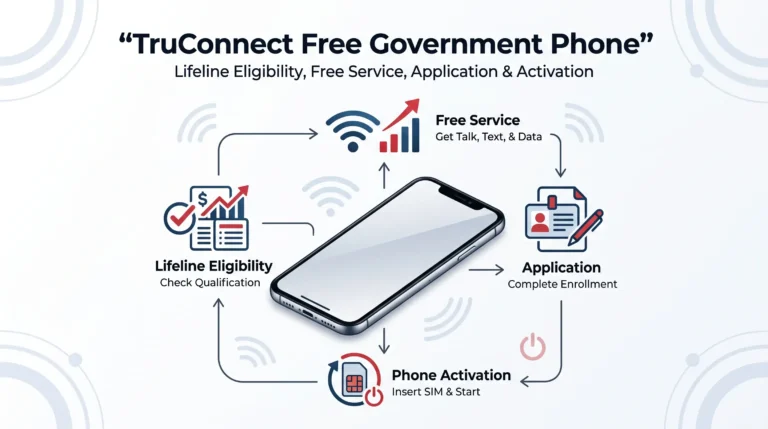
A free or discounted phone service can make a big difference when your budget is tight. For eligible households, TruConnect Lifeline service may help reduce the monthly cost of wireless service through the federal Lifeline program.
But there is a lot of outdated information online about “free government phones.” Phone models, plan details, availability, and eligibility requirements can change, so it is important to separate current information from old promotions.
This updated guide explains how TruConnect works, who may qualify, what documents you may need, how to apply, where to find your TruConnect login, and what to know about activating your phone.
Important: Lifeline is a federal benefit, but TruConnect decides which plans and devices it currently offers in your location. A free phone is not guaranteed with every Lifeline enrollment. Device availability can also change.
What Is the TruConnect Free Government Phone Program?
TruConnect is a wireless provider that participates in the federal Lifeline program in eligible areas.
Lifeline provides a monthly discount of up to $9.25 for qualifying phone or internet service, or up to $34.25 on qualifying Tribal lands. Consumers can qualify through certain government assistance programs or based on household income.
TruConnect can apply the Lifeline benefit to eligible wireless service. Depending on your location, plan, and current offers, you may also have access to a device offer.
The important point is that Lifeline is the government benefit; TruConnect is the service provider.
Is TruConnect Really Free?
It can be, but the answer depends on the plan and your location.
Eligible customers may receive Lifeline-supported service at no monthly cost when the benefit covers the qualifying plan. The exact amount of talk, text, data, hotspot access, and other features depends on the current TruConnect offer available to you.
It is safer not to rely on an old article claiming that every customer receives the same amount of data or a particular smartphone.
TruConnect’s current online store also shows that phones are available in multiple models and price ranges, which means a specific iPhone or Motorola model should never be presented as guaranteed with Lifeline enrollment.
Who Can Qualify for TruConnect Lifeline?
There are two main ways to qualify for Lifeline:
1. Qualifying Government Programs
You may qualify if you participate in an eligible program such as:
- SNAP
- Medicaid
- SSI
- Federal Public Housing Assistance
- Veterans and Survivors Pension Benefit
- WIC
- Certain school meal programs
- Certain other qualifying assistance programs
USAC lists SNAP and Medicaid among the qualifying programs and provides the complete eligibility requirements through LifelineSupport.org.
2. Household Income
You may qualify based on your household income.
For 2026, Lifeline income eligibility is generally at or below 135% of the Federal Poverty Guidelines. For a household of one in the 48 contiguous states, D.C., and territories, the 2026 limit is $21,546. For a household of four, it is $44,550. Alaska and Hawaii have higher limits.
| Household Size | 48 Contiguous States, D.C. & Territories |
|---|---|
| 1 | $21,546 |
| 2 | $29,214 |
| 3 | $36,882 |
| 4 | $44,550 |
| 5 | $52,218 |
| 6 | $59,886 |
| 7 | $67,554 |
| 8 | $75,222 |
For households larger than eight, USAC says to add $7,668 for each additional person.
Does SNAP or EBT Qualify You?
Yes. SNAP participation is one of the qualifying pathways for Lifeline.
That means someone receiving SNAP benefits may qualify for Lifeline without using income eligibility, assuming the person meets the program’s other requirements.
However, getting SNAP does not automatically guarantee a free smartphone from TruConnect. The Lifeline benefit and any available device offer are separate parts of the process.
What About Medicaid?
Medicaid is also a qualifying program for Lifeline.
If you receive Medicaid, you can use your participation as the basis for your Lifeline application, subject to verification.
Keep your official Medicaid documentation available in case additional proof is requested.
What Documents Do You Need?
The exact documents requested can depend on how your eligibility is verified.
USAC says applicants may be asked for documentation proving income or participation in a qualifying program. Documents may need to show information such as your name, eligibility details, and relevant dates.
Common examples include:
| Document Type | Examples |
|---|---|
| Identity | State ID, driver’s license, passport |
| Program eligibility | SNAP benefit letter, Medicaid documentation, SSI documentation |
| Income | Tax return or qualifying income documentation |
| Address | Documents requested during the application process |
Make sure uploaded documents are clear and readable. Avoid sending unnecessary personal information.
How to Apply for TruConnect Lifeline Service
The application process starts with determining whether you qualify for Lifeline.
Step 1: Check Your Eligibility
Use the official Lifeline eligibility information at LifelineSupport.org.
USAC says eligible consumers can qualify based on participation in a qualifying program or household income.
Step 2: Complete the Lifeline Verification
The National Verifier is used in most states to determine Lifeline eligibility. USAC explains that service providers generally use the National Verifier for consumer eligibility, with certain state-specific exceptions.
Step 3: Apply With TruConnect
After determining your eligibility, follow the current TruConnect application process for your area.
Plan availability can differ by location, so enter accurate information when completing the application.
Step 4: Provide Supporting Documents
If documentation is requested, upload the required files through the approved application process.
Do not send your EBT PIN, bank password, or other information that is not requested.
Step 5: Wait for the Result
Your application may be approved, denied, or sent back for additional information.
Avoid websites that promise guaranteed approval or ask you to pay a fee just to submit a Lifeline application.
TruConnect Free Phone: What Device Will You Get?
This is one of the areas where online articles often become misleading.
TruConnect’s current store lists many smartphones, including Motorola, Samsung, and Apple devices. The store currently shows models such as the Motorola G Play, Samsung Galaxy A14 5G, Motorola G 5G, iPhone SE, Galaxy A15 5G, and other devices.
However, the current retail catalog does not mean those phones are automatically free through Lifeline.
Your device options may depend on:
- Your state
- Your plan
- Your eligibility
- Current promotions
- Available inventory
- Whether a device offer is attached to your enrollment
For that reason, do not count on receiving a specific iPhone or Motorola model before TruConnect confirms the offer.
Can You Bring Your Own Phone?
Using your existing compatible phone can be another option.
TruConnect supports wireless service and device options, but compatibility requirements and current BYOD rules should be checked with TruConnect before switching service.
Bringing your own compatible device can be useful when you already have a phone you like.
TruConnect Login: How to Access Your Account
Customers looking for TruConnect login information should use the provider’s current account page rather than random third-party login websites.
TruConnect has an online account portal where customers can enter their username or email address and password.
You may be able to use your account to manage information related to your order or service.
If you have forgotten your credentials, use the official password recovery options on the TruConnect website.
How to Activate a TruConnect Phone
After receiving your device or SIM card, follow the activation instructions supplied by TruConnect.
The exact steps can vary depending on whether you received:
- A physical SIM
- An eSIM
- A new TruConnect phone
- A compatible device you brought yourself
Do not use random activation websites found through advertisements or social media posts.
For help with activation and other account issues, TruConnect provides customer support through its official support channels. Its current support page lists 888-434-5890 as a customer-service number.
What Is the Phone Number for TruConnect?
For customer support, TruConnect currently lists:
888-434-5890
TruConnect also states that customers can dial 611 from a TruConnect device for support.
Because phone numbers can change, verify the number on TruConnect’s official website before calling.
What Happened to the Affordable Connectivity Program?
Some older TruConnect articles combine Lifeline and the Affordable Connectivity Program, which can make the information confusing.
The Affordable Connectivity Program (ACP) ended in 2024 after federal funding ran out.
Lifeline is a separate federal program and continues to operate. USAC currently lists the Lifeline benefit and its 2026 eligibility rules.
You should therefore not assume that an old ACP promotion is still available through TruConnect.
Is There a Contract or Credit Check?
TruConnect’s current online store describes its service as having no contracts, no commitments, and no credit checks.
That does not mean every service or device is completely free. Always review the offer shown during enrollment before accepting it.
One Lifeline Benefit Per Household
One important rule often gets overlooked.
USAC states that only one Lifeline benefit is allowed per household.
If another member of your household already receives a Lifeline benefit, applying for another one may create an eligibility issue.
Never provide false information about your household simply to try to obtain a second benefit.
Common Reasons a Lifeline Application Can Be Delayed
An application may need additional review for several reasons.
Your information could fail to match government records. Documents may be unreadable or outdated. Someone in the household may already have a Lifeline benefit. You may also need to provide additional proof of eligibility.
USAC says applicants may be contacted when additional documentation is needed.
Before submitting your application, make sure your name, date of birth, address, and eligibility information are accurate.
How to Avoid TruConnect Scams
Be careful when searching for a government phone online.
A legitimate Lifeline application should not require you to give someone your EBT PIN or banking password.
Watch for claims such as:
“Guaranteed iPhone for everyone.”
“Instant approval with no verification.”
“Pay us to unlock your government phone.”
“Send your EBT card PIN to reserve your phone.”
These are serious warning signs.
Use official Lifeline and TruConnect websites whenever possible.
TruConnect Login, Application, and Activation: Quick Reference
| What You Need | Where to Start |
|---|---|
| Check Lifeline eligibility | LifelineSupport.org |
| Apply for service | Official TruConnect website |
| TruConnect login | Official TruConnect account portal |
| Account management | TruConnect online account |
| Phone activation | Instructions provided by TruConnect |
| Customer support | 888-434-5890 or 611 from a TruConnect device |
The current TruConnect account page provides a login option for customers.
Frequently Asked Questions
Is TruConnect a government program?
No. TruConnect is a wireless provider. It participates in the federal Lifeline program, which provides a monthly benefit to eligible consumers.
Can I get a free TruConnect phone with EBT?
SNAP can make you eligible for Lifeline, but EBT does not automatically guarantee a free smartphone. Any device offer depends on your location, eligibility, current promotion, and inventory.
Can Medicaid qualify me for TruConnect?
Medicaid is one of the programs that can qualify a consumer for Lifeline.
What is the 2026 income limit for Lifeline?
For the 48 contiguous states, D.C., and territories, the 2026 limit is 135% of the Federal Poverty Guidelines. The limit is $21,546 for one person and $44,550 for a household of four.
Where do I find my TruConnect login?
Use the official TruConnect account page rather than a third-party login website. The current account portal provides fields for your username or email and password.
What is the phone number for TruConnect?
TruConnect currently lists 888-434-5890 for customer support and says customers can also dial 611 from a TruConnect device.
Does TruConnect still offer Lifeline?
TruConnect continues to offer wireless services and maintains support resources for its customers. Lifeline itself remains an active federal program in 2026.
Can I use my own phone with TruConnect?
Depending on your plan and device, BYOD may be available. Check TruConnect’s current compatibility and enrollment information before switching.
Final Takeaway
The TruConnect free government phone program is best understood as a combination of Lifeline eligibility and TruConnect’s current wireless offers.
SNAP, Medicaid, SSI, and other qualifying programs may help you meet Lifeline eligibility requirements, while income-based eligibility is also available at or below 135% of the 2026 Federal Poverty Guidelines.
A smartphone may be offered in some situations, but no specific phone model should be treated as guaranteed. TruConnect’s current device catalog changes, and the availability of a free or discounted device can depend on your location and offer.
For the safest application experience, verify your eligibility through the official Lifeline process, use TruConnect’s official website, protect your personal information, and confirm the current plan and device details before completing enrollment.
That approach is much more reliable than relying on old claims about guaranteed iPhones, fixed data amounts, or automatic approval.