Buying a new laptop isn’t as simple as it used to be. Walk into any electronics store or browse an online marketplace and you’ll see hundreds of models with different processors, RAM sizes, displays, graphics cards, and price tags. Choosing the wrong laptop can leave you with slow performance, poor battery life, or features you’ll never use.
The good news is that finding the right laptop doesn’t have to be difficult.
This guide breaks everything down into simple steps so you can confidently choose a laptop that fits your needs and your budget. Whether you’re a student, remote worker, gamer, programmer, content creator, or someone who simply needs a reliable computer for everyday tasks, you’ll find practical advice here.
We Asked Laptop Experts What Buyers Should Focus On
Before writing this guide, we reviewed recommendations from computer technicians, IT professionals, hardware reviewers, and repair specialists to understand what matters most when buying a laptop.
The strongest advice was surprisingly consistent.
Instead of buying the most expensive laptop, experts recommend buying the laptop that matches your daily workload.
Many people overspend on powerful hardware they’ll never use, while others buy the cheapest model available and regret it within a year.
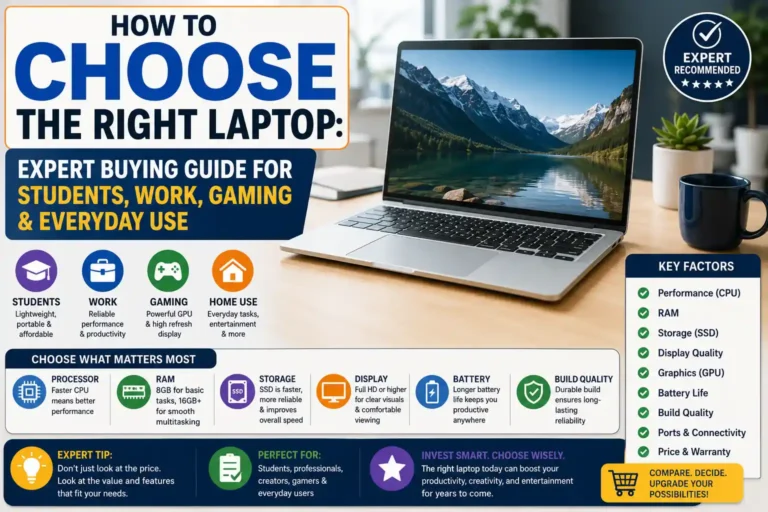
According to the experts we reviewed, buyers should prioritize:
- Performance that matches daily tasks
- Enough RAM for future needs
- Fast SSD storage
- Reliable battery life
- Comfortable keyboard
- Good display quality
- Trusted manufacturer warranty
Everything else comes second.
Step 1: Decide What You Need Your Laptop For
This is the most important decision you’ll make.
Don’t start by looking at brands.
Start by asking yourself:
“What will I actually use this laptop for?”
Different activities require different hardware.
| Primary Use | Recommended Laptop Type |
|---|---|
| Web browsing | Budget laptop |
| School work | Student laptop |
| Office work | Business laptop |
| Programming | Mid-range performance laptop |
| Graphic design | Creative workstation |
| Video editing | High-performance laptop |
| Gaming | Gaming laptop |
| Home use | Everyday laptop |
Once you know your purpose, choosing becomes much easier.
Best Laptop for Students
Students don’t usually need the most powerful machine.
A good student laptop should offer:
- Long battery life
- Lightweight design
- Comfortable keyboard
- Fast SSD
- Reliable webcam
- Affordable price
Ideal specifications:
- Intel Core i5 or AMD Ryzen 5
- 16GB RAM
- 512GB SSD
- 14-inch display
Best Laptop for Home Use
Most families use laptops for:
- Paying bills
- Watching Netflix
- Browsing social media
- Online shopping
- Zoom calls
You don’t need expensive gaming hardware for these tasks.
Recommended specifications:
- Intel Core i3 or Ryzen 3
- 8–16GB RAM
- SSD storage
- Full HD display
Best Laptop for Office Work
Business users often multitask.
Typical workflow includes:
- Excel
- Word
- Chrome with many tabs
- Microsoft Teams
- Zoom
- Outlook
A business laptop should prioritize reliability over flashy features.
Recommended specifications:
- Intel Core i5
- Ryzen 5
- 16GB RAM
- 512GB SSD
Best Laptop for Gaming
Gaming requires much stronger hardware.
A gaming laptop should include:
- Dedicated graphics card
- High refresh-rate display
- Powerful processor
- Advanced cooling system
Recommended hardware:
- Intel Core i7
- AMD Ryzen 7
- NVIDIA RTX graphics
- 16–32GB RAM
Best Laptop for Programming
Software developers usually run:
- Visual Studio
- VS Code
- Android Studio
- Docker
- Virtual Machines
Programming benefits from:
- Fast processor
- Plenty of RAM
- Large SSD
Recommended specs:
- Intel Core i7
- Ryzen 7
- 16GB RAM minimum
- 1TB SSD preferred
Best Laptop for Video Editing
Video editing demands powerful components.
Editors working with:
- Adobe Premiere Pro
- DaVinci Resolve
- Final Cut Pro
should look for:
- Dedicated GPU
- High-resolution display
- Large SSD
- Color accuracy
Step 2: Set a Realistic Budget
Experts recommend setting your budget before comparing brands.
Here’s a practical breakdown.
| Budget | Best For |
|---|---|
| Under $400 | Basic browsing |
| $400–700 | Students & home use |
| $700–1,000 | Office work & multitasking |
| $1,000–1,500 | Programming & creative work |
| $1,500+ | Gaming & professional editing |
Buying more power than you need isn’t always a smart investment.
Step 3: Windows, Mac, or Chromebook?
This question confuses many buyers.
Each platform serves different users.
Windows Laptops
Best for:
- Students
- Office workers
- Gamers
- Engineers
- Most home users
Advantages:
- Largest software library
- Wide price range
- Easy upgrades
- Gaming support
Popular manufacturers include:
- Dell
- Lenovo
- ASUS
- Acer
- HP
- MSI
Apple MacBooks
MacBooks are popular among:
- Designers
- Video editors
- Photographers
- Developers
- Business professionals
Advantages include:
- Excellent battery life
- Premium build quality
- Quiet operation
- Outstanding trackpad
- Strong security
Choose a Mac if you already use:
- iPhone
- iPad
- Apple Watch
The Apple ecosystem works extremely well together.
Chromebooks
Chromebooks are designed primarily for online tasks.
Best for:
- Students
- Web browsing
- Google Docs
- Streaming
Advantages:
- Affordable
- Fast startup
- Good battery life
- Simple interface
Limitations:
- Limited professional software
- Not ideal for gaming
- Limited offline capabilities
Step 4: Choose the Right Processor (CPU)
The processor is often called the brain of your laptop.
Choosing the right CPU affects:
- Speed
- Battery life
- Multitasking
- Overall performance
Fortunately, choosing isn’t as complicated as it sounds.
Intel Processors
Intel processors generally fall into four categories.
Core i3
Good for:
- Web browsing
- Documents
- Streaming
Core i5
The best choice for most people.
Suitable for:
- School
- Office work
- Moderate multitasking
- Everyday productivity
Core i7
Ideal for:
- Programming
- Editing
- Gaming
- Heavy multitasking
Core i9
Designed for professionals who regularly perform demanding tasks like 4K video editing, advanced engineering software, or high-end gaming.
AMD Ryzen Processors
AMD has become a serious competitor to Intel.
Common choices include:
- Ryzen 3
- Ryzen 5
- Ryzen 7
- Ryzen 9
Performance is comparable to Intel, and Ryzen laptops often provide excellent value.
Which CPU Should You Choose?
| User | Recommended Processor |
|---|---|
| Basic home use | Intel Core i3 / Ryzen 3 |
| Students | Intel Core i5 / Ryzen 5 |
| Office work | Intel Core i5 / Ryzen 5 |
| Programming | Intel Core i7 / Ryzen 7 |
| Gaming | Intel Core i7 / Ryzen 7 |
| Professional editing | Intel Core i9 / Ryzen 9 |
Expert Tip
Laptop experts consistently recommend avoiding outdated processors, even if the price looks attractive. A newer mid-range CPU often delivers better long-term value than an older high-end model because it typically offers improved performance, battery efficiency, and software support.